This section outlines various plans and procedures as requested by ADATUM. The covered items in this section include the basic domain structure, organizational unit layout, and various plans and procedures for standard naming conventions, IP scopes and proposed policies. Additional documentation may be required to address some policies and will be provided by the IT manager, where necessary.
Note: Many additional policies will be implemented and configured in the ADTAUM production environment based on expected needs. The following are merely overview-level concepts and should be discussed with the IT manager and IT project leader to determine ADATUM’s specific policy needs.
Domain Structure#
A chosen domain name, “adatum.local” will be utilized. If deemed necessary by the IT manager, this domain name may be altered before being set. If altered, be sure to document this adjustment. The primary domain controller will be SVR-DC1 and will handle the requirements of the deployment. SVR-DC1 will be the primary domain controller at this time, with considerations made throughout the documentation to intentionally enable scalability, if necessary, in the future to include more than one domain controller.
Note: Subsequent domain controllers added later should follow the standard naming convention to avoid confusion (for example, if a secondary/tertiary domain controller is added, these should be named SVR-DC2 and SVR-DC3, respectively).
Organizational Units#
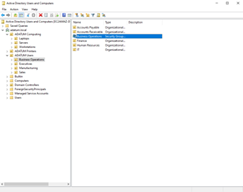
The following Organizational Units are to be created and utilized throughout the company, as per the ADATUM’s organization chart provided. The OU structure is subject to change should the IT manager determine additional units are necessary or deem units unnecessary. Please check with the IT manager to verify the correct organizational units have been defined and update as needed.
adatum.local
├── ADATUM Users
│   ├── Executives
│   │   ├── CEO
│   │   ├── VP Sales
│   │   ├── VP Manufacturing
│   │   └── VP Business Operations
│   ├── Business Operations
│   │   ├── Finance
│   │   ├── Accounts Receivable
│   │   ├── Accounts Payable
│   │   ├── IT
│   │   └── Human Resources
│   ├── Sales
│   │   ├── US Sales
│   │   ├── Marketing
│   │   └── Service
│   └── Manufacturing
│       ├── Shipping
│       ├── Receiving 1
│       ├── Receiving 2
│       └── Parts
├── ADATUM Computers
│   ├── Workstations
│   ├── Laptops
│   └── Servers
│       ├── SVR-DC1
│       └── SVR-DC2 (if added later)
└── ADATUM Printers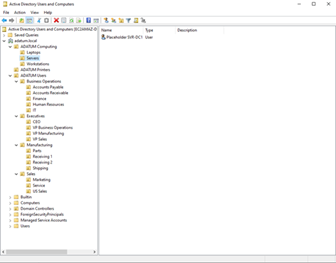
Workstation Imaging/Deployment#
The intended method of imaging will be Microsoft Deployment Toolkit. You (the installer) will use a reference image and make changes/updates as needed. This method is a more hands-on approach and will be used in conjunction with PXE (network image installation) when flashing new/existing Workstations to boot over the network. Microsoft Deployment Toolkit will handle the domain policies and security settings that are crucially important, as well as software if applicable. These configurations and determinations will be given to you by the IT manager in a separate document.
Intended Process#
- Configure the initial workstation and use it as a reference image
- PXE boot for network deployment for new workstations
- Microsoft Deployment Toolkit applies applicable configurations as outlined by the IT manager (see separate document provided by the IT manager)
Naming Conventions (Users, Groups, Devices)#
Industry-standard naming conventions are to be used for simplicity based on the following guidelines:
Users#
Users will be named with the following convention: First Initial + Last Name
Examples

asmith (Allen Smith)
If a username is taken, in the event of a duplicate, a number will append the username. The number will infinitely increment as many times as needed.
Examples

asmith1 (Allyson Smith)
asmith2 (Albert Smith)
asmith3 (Andy Smith)Groups#
Groups will be named based on the group type, followed by the department.
Examples

SG-IT			(Security Group for the IT department)
SG-Executives (Security Group for the Executives)Devices#
Devices will be named based on the following convention: Device Type Abbreviation + Custom Identifier PRN-Warehouse (Printer belonging to the Warehouse department)
Examples

SVR-DC1 			(The Domain Controller server)
WS-US-Sales-14		(A workstation belonging to the US Sales department, with a unique identifier (14) indicating the specific workstation in the department)
Naming Conventions (File Sharing)#
Use the following naming conventions for each department when implementing file sharing unless otherwise instructed by the IT manager:
\\SVR-DC1\ADATUM Storage\DepartmentExamples
\\SVR-DC1\ADATUM Storage\Business Operations (Domain Controller\Storage Path\Business Operations Organization Unit)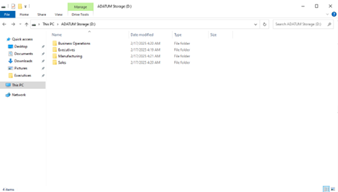
DNS Plan#
The DNS Server will be hosted on SVR-DC1 with the installed DNS Server feature. A forward lookup zone located at adatum.local and a reverse lookup zone located at 0.16.172.in-addr.arpa will be implemented within the DNS Server settings. The standard external DNS forwarders for Google (8.8.8.8 and 8.8.4.4) and Cloudflare (1.1.1.1) will be used to resolve public sites. All DNS services will be hosted on SVR-DC1, except for external forwarders. Use the following configuration information (later reiterated in the configuration instructions) when implementing the DNS Plan:
Forward Lookup Zone: 		adatum.local
Reverse Lookup Zone:		0.16.172.in-addr.arpa

External DNS Forwarders:	Google
				 			8.8.8.8

							Cloudflare
				 			1.1.1.1
DHCP Plan#
The DHCP Server will be hosted on SVR-DC1. The 172.31.16.0/24 subnet, with an intended IP range of 172.31.16.20–172.31.16.200 will be utilized for this documentation. Reservations in this deployment will include a static IP address for the CEO, as per the overview request, as well as a range of reserved IP addresses for critical company devices, such as printers and other IoT. This basic plan should be followed throughout the lifecycle of ADATUM’s deployment, unless otherwise altered by the IT manager and/or IT project lead.
Note: We recommend using VLANs for separation of duties and clients as is typical for security purpose. However, this was not requested by ADATUM and thus the DHCP Plan does not reflect this.
DHCP Scope

Subnet: 	172.31.16.0/24
IP Range: 	172.31.16.22 through 172.31.16.200
IP Reservations
CEO: 172.31.16.201
Printers and other IoT Devices: 172.31.16.202 through 172.31.16.230Lease Duration: 24 hours for Workstations and Laptops/Smartphones.
Server(s) will be assigned static IP addresses outside of the DHCP scope.
Secondary DHCP server to be hosted in a cloud environment for redundancy upon request.Remote Access Plan#
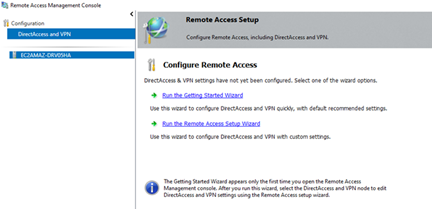
An ADATUM VPN for remote access connections will be configured with the assistance of the IT manager. With a VPN, employees will have access to resources on the go and wherever they might be. As part of the Remote Access Plan, a user device policy should be enacted to ensure user devices have installed prerequisites, such as lock screens and strict timeouts, authentication tokens, approved location zones, anti-virus software, etc. Only members of the ADATUM group will be allowed to connect to the VPN.
Accomplish this task by using the Routing and Remote Access Service in Windows Server 2022 with additional documentation and instruction from the IT manager.
A User Device Policy is strongly recommended. As this documentation does not cover third party services and installation, this is not covered. Please see the IT manager for assistance implementing settings for the ADATUM VPN, with considerations for requirements found in this policy. If a user device policy has not been created, it is highly recommended to have a proposal drafted and submitted to the relevant parties for review to establish one.
Print Services#
To address and satisfy the print requirements, the Document and Print Services role on Windows Server 2022 will act as the print manager. Follow the proposed naming convention for each added printer, then delegate security settings and permissions according to each department. See the IT manager for specific details regarding how each department should be handled when printing, including which departments/specific people have access to color printers (if applicable).
Organizational Unit Security Groups#
Security settings will be set to Full Control for the executives in their respective departments, and granularity depending on necessary functions at the base user level will be set according to needs.
- No user at the base level will possess permissions beyond necessary, ensuring integrity of data.
- Each department will have its own Security Group, with users added within their respective departments.
Group Policy Management#
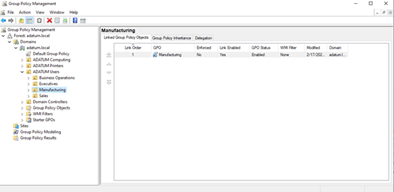
The Group Policy Management feature in Windows Server 2022 will be implemented and allows fine control over the settings, files structures and other policies each department and user have access to. The settings will largely depend on the department’s needs. However, certain global variables will be implemented for everyone, such as the standard password policy. See the IT manager for specific configuration changes needed regarding ADATUM’s policy needs. Document these changes accordingly.
Central Updates Server#
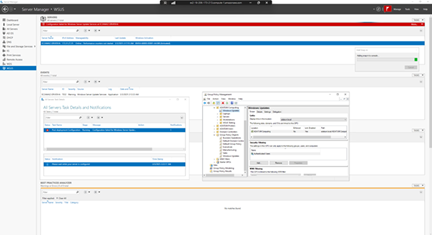
To manage central updates, Windows Server Update Services will be installed and configured on the domain controller and will manage all Windows-based devices.
Updates will be managed and deployed via Group Policy configuration(s), and a testing phase will be issued with a preconfigured group to mitigate potential issues that may arise because of a misconfigured or maladapted patch. Updates to all Windows-based devices should take a staggered approach, or phased roll-out. Additionally, a fallback plan will be implemented, which includes using WSUS update retraction, to make sure we have a plan in place should a workstation require a rollback.
The following screenshot includes a peak at the GPO created for Windows Updates and linked to the OU for ADATUM Computing. Additionally, a SG was created for testing WSUS testing purposes – this satisfies our test environment requirement and is intended to be utilized to vet Windows Updates before rollouts happen to production, reducing the chance for failed or misconfigured updates that may result in bricking systems at scale.
Backup, Data Encryption & Recovery#
- The Windows Server Backup service as a built-in service to Windows Server 2022 will be used to manage backup and recovery requirements. For data encryption, BitLocker will be used, with encryption keys stored/managed by the IT department, respectively.
- Virtual Machines (via Hyper-V Replication Services)/Workstations will utilize the backup feature on a daily schedule.
- File Shares will utilize the backup feature on a daily schedule.
- User Data will utilize the backup feature on a daily schedule.
- Snapshots to include Domain Controller where needed, and/or full backup with daily schedule.
- Configuration backups are highly encouraged.
- Dedicated backup drive to be utilized – drive not to be used for read/write, except for backups, to prevent unnecessary write cycles that may reduce the lifespan of the drive(s).
All backups are intended to be stored locally on the domain controller handling Backup and Recovery feature sets, but we recommend offloading this process to a secondary server dedicated to handling these tasks in the future. Ideally, we also propose that a cloud backup solution is utilized to ensure off-site backup availability in the event of an on-site disaster, following typical disaster and recovery techniques. Again, this solution is cloud-conscious to ensure a smooth transition to cloud services should ADATUM request these features in the future.
- Encryption via BitLocker includes encryption of backups, documents including user and company data, and entire machine storage devices if necessary. Encryption keys are to be stored and managed by the IT department, with access limited to management/administrative relevance.
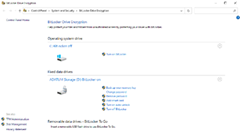
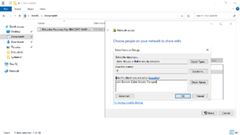
Recovery is to be handled by selecting previous file versions via Windows Server Backup in case of a disaster event, defined as any machine in an unrecoverable state, provided that a recent and applicable backup was created. Additionally, we recommend that recovery keys are stored in a cloud-managed, off-site encryption vault, which the IT manager and project leader (if necessary) have access to. Storing keys in this fashion can help reduce the likelihood of unrecoverable keys, as in the case of a disaster event affecting the machine that contains the storage for such keys.
Managing High Availability#
The current ADATUM proposal includes a single Domain Controller. However, to ensure high availability if requested, it is recommended to add a secondary server (SVR-DC2). Using Failover Clustering, Hyper-V Migration/Replication Services, and a secondary DNS server (located on SVR-DC2), high availability can be achieved to offset downtime occurred by disaster states. Additionally, with a secondary server, we can implement a redundant Active Directory service to enable authentication for user access per to ensure operations proceed per usual, even during a primary outage.
In the ideal proposed environment, some of these services will be hosted in a cloud configuration to prevent the redundancy hardware from failing alongside the primary hardware in the event of an on-site disaster, such as a fire or damage due to an earthquake or other natural phenomenon.
Failover Clustering#
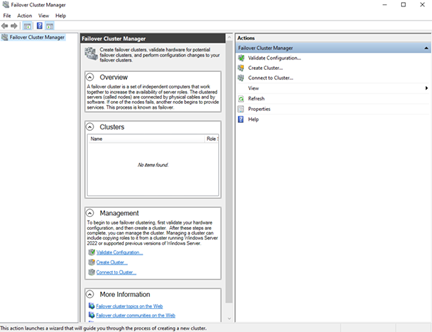
Failover Clustering can be utilized within Windows Server 2022, linking another server and acting as a redundancy method. In this system, when a controller fails, a redundant controller will be initiated with the clustering service to pick up where the failure occurred. The IT department will be notified of such an event, and appropriate measures can be taken to rectify an out-of-service controller. This method prevents unreasonable downtime for ADATUM’s production environment.
Hyper-V Replication Services#
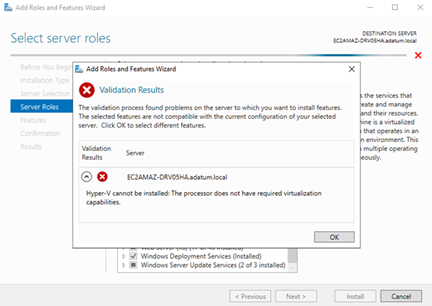
Note: In the current demonstration, this environment does not support this feature – a screenshot of the running environment could not be provided. In ADATUM’s environment, the Hyper-V Replication Service will be utilized to perform virtual machine management, including backup and recovery. Please contact the IT project lead for more information on ADATUM’s specific configuration for the hardware on-site. The processor must support virtualization in ADATUM’s environment.
DNS Failover#
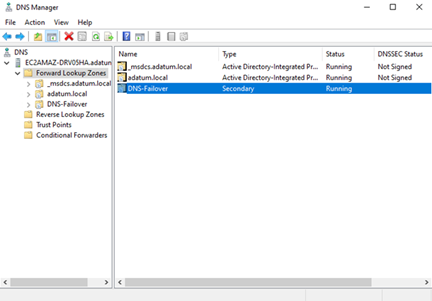
A secondary DNS server can be utilized to manage an event affecting DNS resolution services. In such an event, the secondary DNS server will handle resolution until the primary DNS service can be restored, ensuring success web traffic for ADATUM’s users and services.
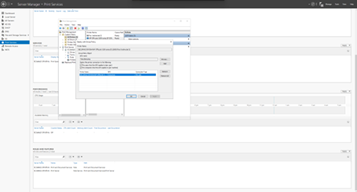
Note: The secondary DNS server created in the following screenshot is 8.8.8.8 (Google DNS). However, in ADATUM’s production environment, this server points to the failover DNS server located on the redundant domain controller (SVR-DC2). This accomplishes an internal DNS in the event of a disaster event affecting the primary domain controller. Please contact the IT manager for which secondary DNS address to use, if configuring a secondary server for this purpose.
Event Monitoring & Recommendations#
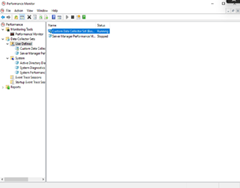
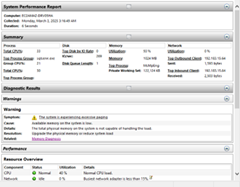
The following encompasses a plan to monitor system events and supervise the production environment from a high level. For this, please use Windows Performance Monitor, Event Viewer and Resource Monitor.
Within these tools, a wide range of monitoring filters to detect unauthorized login attempts, storage usage and available space, and CPU/RAM/Disk and Network usage will be used to monitor environmental health. Additionally, these tools will be used in creating baseline statistics and ongoing monitoring to track potential issues with overall performance and health. Using these tools will satisfy several basic requirements for monitoring system performance and will ensure that the IT department can effectively track and deploy corrective action(s) for issues that may arise because of performance inconsistencies.
To best supervise the environment, the following priorities are considered in this plan:
Baseline statistics with a custom data set affecting the following values:
- CPU utilization under normal load
- Memory utilization under normal load
- RAM utilization under normal load
- Network utilization under normal load
- Disk utilization under normal load
Ongoing monitoring after baseline statistics have been established
- New baseline statistics to be generated after hardware installations, failures, additions to workstation connections, etc.
- Thresholds to be set with notification settings via email or IT department’s preferred method of incident notification (see IT manager for notification preference)
Security auditing via Event Viewer
Performance Monitor & Custom Data Sets#
Use custom data collector filters for the IT department to review over time. These logs will automatically generate and are the primary tool used to detect issues within the system itself.
Event Viewer#
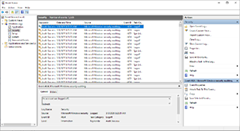
Monitor system and security logs to detect errors, unauthorized access attempts service failures in real-time.
Resource Monitor#
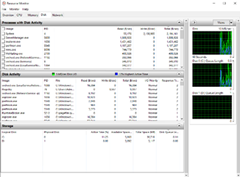
Live performance metrics, including CPU, memory, disk and network activity, similar to Performance Monitor.
Basic Password Policy Principles#
These settings can be managed in the Group Policy settings and should always be considered for new users when added.
- Standard password complexity
- Password expiration length to of appropriate choosing
- Password minimum length
- New employees must change their password upon first sign-in