While waiting for parts to complete the pbs.lab build (it’s been many weeks), I moved on to another prerequisite project that needed to be finished before the more interesting services could be deployed. Network UPS Tools (NUT) provides a central server that monitors one or more UPS units and exposes their status to other systems. Those systems can then respond to power events and shut down cleanly when the available battery capacity reaches a defined threshold. This was previously running in my home lab prior to the rebuild, so it’s a good idea to not only get it running again, but put it in a far more advanced state than previously deployed.
For this lab, the design is slightly more complicated than installing NUT against a single UPS and waiting for a low-battery signal. My rack already uses two APC UPS units and two APC AP7750 Automatic Transfer Switches.
UPS 1: 172.16.10.141
UPS 2: 172.16.10.142

ATS 1: 172.16.10.143
ATS 2: 172.16.10.144
Both ATS units can draw power from either UPS, but each has a preferred source.
ATS 1 prefers UPS 1.
ATS 2 prefers UPS 2.
ATS 1 carries the larger server load. ATS 2 carries the lower-power infrastructure that I consider more important during an extended outage, including networking and the Dell Wyse Proxmox nodes.
The goal is not to keep every system running until both UPS units are exhausted, but rather remove the large server load early enough that the remaining capacity can support DNS, routing, switching, and the rest of the critical network stack for as long as possible.
Choosing the NUT Server#
The first decision was where the NUT server should live. NUT generally consists of a server and one or more clients.
- NUT Server communicates with the UPS units and exposes their status.
- NUT Clients monitor the NUT server and participate in shutdown behavior.
The Dell Wyse PVE nodes (wyse01.lab and wyse02.lab) are considered critical always-on infrastructure because they host the redundant DNS services, and eventually, Home Assistant, Traefik, Authentik, etc.
Because it made the most logical sense, I installed the NUT server directly on the wyse01.lab Proxmox host. Installing NUT directly on the Proxmox host is important here, because if the NUT clients were installed only inside a VM or container, the shutdown command would stop that individual guest instead of the entire physical node. During a real outage, I need the Proxmox host and everything running on it to shut down cleanly.
The remaining systems participate as clients.
home.lab
172.16.10.240
Monitors UPS 1

wyse02.lab
172.16.10.242
Monitors UPS 2

pbs.lab
172.16.10.243
Monitors UPS 2

(and eventually learn.lab when the rebuild is in a place that supports an additional spin-up for testing)
wyse01.lab monitors both UPS units locally because it is the NUT server and shutdown controller
Installing NUT#
I installed NUT Server and Client directly the wyse01.lab Proxmox host.
apt install nut nut-server nut-client nut-snmp snmp -yI installed nut-client on the server as well. Even though wyse01.lab is the system monitoring the UPS units, it still needs the local NUT monitor components and may eventually participate in a final shutdown stage if the outage lasts long enough.
Moving UPS Cards to SNMPv3#
Both APC UPS Network Management Cards previously used SNMPv1. The management cards were already restricted to approved SNMP managers, so an unauthorized query generated a security alert and returned no useful data. I added wyse01.lab as an approved manager on both cards.
While making that change, I revisited an older item from the lab backlog last year, which included migrating UPS monitoring from SNMPv1 to SNMPv3. The reason this wasn’t done sooner is simply that, at the time, SNMPv3 was not supported with NUT, and thus I had to remain on SNMPv1.
I disabled SNMPv1 access on both UPS cards and created a dedicated SNMPv3 account for NUT using authenticated and encrypted communication. After the SNMPv3 account was configured, I tested each UPS from wyse01.lab.
snmpwalk \
  -v3 \
  -u nut \
  -l authPriv \
  -a SHA \
  -A '<SNMP_AUTH_PASSWORD>' \
  -x AES \
  -X '<SNMP_PRIVACY_PASSWORD>' \
  172.16.10.141 \
  1.3.6.1.2.1.33
snmpwalk \
-v3 \
-u nut \
-l authPriv \
-a SHA \
-A '<SNMP_AUTH_PASSWORD>' \
-x AES \
-X '<SNMP_PRIVACY_PASSWORD>' \
172.16.10.142 \
1.3.6.1.2.1.33Both units returned the standard UPS MIB tree, including manufacturer, model, battery charge, estimated runtime, input voltage, output load, and alarm information. I won’t pretend to understand all the exposed MIB tree information. A Google search for specific values is more than sufficient.
Manufacturer: APC
Model: Smart-UPS 1500
Battery charge: 100%
Input voltage: approximately 117-118 VAC
With authenticated SNMP communication working, it’s time to move onto the NUT configuration.
Configuring UPS Definitions#
The two UPS devices are defined in in following file:
/etc/nut/ups.conf[apc1]
driver = snmp-ups
port = 172.16.10.141
desc = "APC Smart-UPS 1500 1"
snmp_version = v3
secName = nut
secLevel = authPriv
authProtocol = SHA
authPassword = "<SNMP_AUTH_PASSWORD>"
privProtocol = AES
privPassword = "<SNMP_PRIVACY_PASSWORD>"
[apc2]
driver = snmp-ups
port = 172.16.10.142
desc = "APC Smart-UPS 1500 2"
snmp_version = v3
secName = nut
secLevel = authPriv
authProtocol = SHA
authPassword = "<SNMP_AUTH_PASSWORD>"
privProtocol = AES
privPassword = "<SNMP_PRIVACY_PASSWORD>"Enabling Network Server Mode#
NUT defaults to no operating mode until one is selected. To have NUT operate in server mode, a small adjustment to the configuration file must be made.
/etc/nut/nut.confChange from none to:
MODE=netserverThis allows wyse01.lab to expose the UPS data to remote NUT clients.
Configuring NUT Users#
I created separate accounts for administration, the local monitor, and remote clients and saved the passwords in the password manager per usual.
/etc/nut/upsd.users[admin]
password = "<NUT_ADMIN_PASSWORD>"
actions = SET
instcmds = ALL
[observer]
password = "<NUT_MONITOR_PASSWORD>"
upsmon master
[client]
password = "<NUT_CLIENT_PASSWORD>"
upsmon slaveThe administrative account can issue supported commands. The observer account is used by the local NUT monitor on wyse01.lab, and the client account is used by the remote systems.
Configuring the Local Monitor#
I then configured wyse01.lab to monitor both UPS units.
/etc/nut/upsmon.confMONITOR apc1@localhost 1 observer "<NUT_MONITOR_PASSWORD>" master
MONITOR apc2@localhost 1 observer "<NUT_MONITOR_PASSWORD>" masterwyse01.lab is the only system that communicates directly with the UPS NMC’s. The remote systems retrieve their status through the NUT server instead and do not directly communicate with either UPS.
Allowing Remote NUT Clients#
By default, NUT server listens only on localhost. I added the management address for wyse01.lab.
/etc/nut/upsd.confLISTEN 127.0.0.1 3493
LISTEN 172.16.10.241 3493A NUT server and monitor restart is then required.
systemctl restart nut-server
systemctl restart nut-monitor
Configuring NUT Clients#
On home.lab, wyse02.lab, and pbs.lab, I installed nut-client and updated their configurations.
apt install nut-client -yEach client uses network-client mode, so this configuration change needs to be made.
/etc/nut/nut.confChange from none to:
MODE=netclientThe monitor configuration depends on which UPS normally feeds the device. All network-critical infrastructure feeds off UPS 2, while both home.lab and learn.lab feed from UPS 1. This design is completely intentional and simplifies my life when worrying about which device is fed from where.
home.lab#
MONITOR apc1@172.16.10.241 1 client "<NUT_CLIENT_PASSWORD>" slavewyse02.lab#
MONITOR apc2@172.16.10.241 1 client "<NUT_CLIENT_PASSWORD>" slavepbs.lab#
MONITOR apc2@172.16.10.241 1 client "<NUT_CLIENT_PASSWORD>" slaveAfter restarting the NUT monitor on each client, I tested access to both UPS units.
upsc apc1@172.16.10.241 ups.status
upsc apc2@172.16.10.241 ups.status
Each client returned the expected OL status, so it’s time to move on.
Validating Live UPS Telemetry#
From the NUT server, I checked the most important values from each UPS.
upsc apc1 | grep -E \
"battery.charge|battery.runtime|battery.runtime.low|ups.load|ups.status"

upsc apc2 | grep -E \
"battery.charge|battery.runtime|battery.runtime.low|ups.load|ups.status"
The initial readings were as expected and matched the dashboard values for each UPS.
APC 1
battery.charge: 100
battery.runtime: 1620
battery.runtime.low: 120
ups.load: 25.30
ups.status: OL

APC 2
battery.charge: 100
battery.runtime: 5520
battery.runtime.low: 120
ups.load: 13.70
ups.status: OL
This immediately showed me why a fixed 10-minute shutdown timer as part of my original concept might not be the best approach here. UPS 1 carries a much larger load and had approximately 27 minutes of estimated runtime. UPS 2 carries the lower-power infrastructure and had approximately 92 minutes of estimated runtime. The shutdown policy needs to consider the purpose of each UPS and their estimated runtimes instead of just starting a timer if an outage has been detected for 10 minutes.
Configuring Email Delivery#
Before working on shutdown logic, I configured email notifications, as this was something I would inevitably put off until I had forgotten about it. I’m not a Postfix guru, but I configured it to relay mail through Gmail on port 587.
apt install libsasl2-modules ca-certificates -ypostconf -e 'relayhost = [smtp.gmail.com]:587'
postconf -e 'smtp_sasl_auth_enable = yes'
postconf -e 'smtp_sasl_password_maps = hash:/etc/postfix/sasl_passwd'
postconf -e 'smtp_sasl_security_options = noanonymous'
postconf -e 'smtp_sasl_tls_security_options = noanonymous'
postconf -e 'smtp_tls_security_level = encrypt'
postconf -e 'smtp_tls_CAfile = /etc/ssl/certs/ca-certificates.crt'I created the Gmail relay credential file and provisioned another app password for NUT alerts.
/etc/postfix/sasl_passwd[smtp.gmail.com]:587 <GMAIL_ADDRESS>:<GOOGLE_APP_PASSWORD>Then I built the lookup database and secured both files.
postmap /etc/postfix/sasl_passwd

chown root:root \
  /etc/postfix/sasl_passwd \
  /etc/postfix/sasl_passwd.db

chmod 600 \
  /etc/postfix/sasl_passwd \
  /etc/postfix/sasl_passwd.db
The local sender address also needed to be rewritten so Gmail would accept the message cleanly, as testing failed DMARC with the default assumed sender.
/etc/postfix/genericroot@wyse01.lab.shannonwetnight.com <GMAIL_ADDRESS>
root@wyse01 <GMAIL_ADDRESS>
root <GMAIL_ADDRESS>
@wyse01.lab.shannonwetnight.com <GMAIL_ADDRESS>I built and enabled the generic map.
postmap /etc/postfix/generic
postconf -e 'smtp_generic_maps = hash:/etc/postfix/generic'

chown root:root \
  /etc/postfix/generic \
  /etc/postfix/generic.db

chmod 644 \
  /etc/postfix/generic \
  /etc/postfix/generic.db
After restarting Postfix, a test message arrived successfully and I could focus on event notification configuration.
NUT Event Notifications#
NUT does not format and send email by itself. upsmon determines which event should execute a notification command, and a separate script handles the message. I am unfortunately responsible for providing said script. This is where back and forth with AI with an exact outline of what the script needs to do worked perfectly in my favor.
/usr/local/bin/nut-notify.sh#!/usr/bin/env bash
set -euo pipefail
TYPE="${1:-UNKNOWN}"
UPS="${2:-UNKNOWN}"
MESSAGE="${3:-No message supplied}"
BODY="
NUT Alert
Event:
${TYPE}
UPS:
${UPS}
Message:
${MESSAGE}
Host:
$(hostname -f)
Time:
$(date --iso-8601=seconds)
"
echo "${BODY}" | mail \
-r "<GMAIL_ADDRESS>" \
-s "NUT Alert: ${TYPE} - ${UPS}" \
"<ALERT_RECIPIENT>"Per usual, make the script executable.
chmod +x /usr/local/bin/nut-notify.shThen I configured upsmon to call it so the magician can use the trick.
/etc/nut/upsmon.confThese notify flags needed to be uncommented as well to make sure I’m receiving applicable notifications.
# Enables the script to be used.
NOTIFYCMD /usr/local/bin/nut-notify.sh

# These are important notify flags that are not enabled by default.
# Add +EXEC as well, otherwise they will not be executed with the script as intended.
NOTIFYFLAG ONLINE   SYSLOG+WALL+EXEC
NOTIFYFLAG ONBATT   SYSLOG+WALL+EXEC
NOTIFYFLAG LOWBATT  SYSLOG+WALL+EXEC
NOTIFYFLAG FSD      SYSLOG+WALL+EXEC
NOTIFYFLAG COMMOK   SYSLOG+WALL+EXEC
NOTIFYFLAG COMMBAD  SYSLOG+WALL+EXEC
NOTIFYFLAG SHUTDOWN SYSLOG+WALL+EXEC
NOTIFYFLAG REPLBATT SYSLOG+WALL+EXEC
NOTIFYFLAG NOCOMM   SYSLOG+WALL+EXEC
I ran a quick test event and it produced the expected email, so the basic NUT notification path is working and I can focus on the shutdown policy.
Shutdown Philosophy#
My original idea was to shut down home.lab after the UPS had been on battery for 10 minutes as mentioned before. Once I could see the actual load, runtime, and battery data from both units, a fixed timer no longer seemed like the best trigger. Runtime changes depending on the attached load. During the initial testing, the UPS units reported approximately 27 minutes of runtime at only 25% load. A 10-minute timer is no-bueno here as the runtime could be much lower when learn.lab is running in tandem with home.lab.
APC 1 is the limiting power source because it normally carries the much larger server load through ATS 1. APC 2 normally carries the lower-power infrastructure connected through ATS 2.
A more useful approach is to perform some basic load shedding while UPS 1 still has a meaningful reserve capacity. That reserve can then support the critical infrastructure connected through the ATS units if UPS 2 becomes unavailable later in the outage, such is the case when the battery is completed depleted. The first important condition to support this is that both UPS units must be on battery before any staged shutdown can begin. This avoids unintentional shutdowns if, for instance, UPS 1 suffers a hardware failure that changes its state to ONBATT or ATS 1 switches to using UPS 2 for the servers. In that case, a hardware failure has occurred, but a power outage has not. I don’t need the entire stack going offline just because a hardware failure has occurred and the load is now all on a single UPS. If that happens, the system is functioning exactly as intended and no shutdown is supposed to happen. Thus, the logic needs to be designed around this consideration.
One UPS on battery:
Likely a failed UPS, disconnected input, or isolated source problem.
Allow the ATS hardware to transfer around the failed source.

Both UPS units on battery:
Likely a utility outage.
Begin evaluating the staged shutdown thresholds.
Stage 1:
Both UPS units report an on-battery state.
APC 1 reaches 60% battery charge.
Shut down home.lab.
Stage 2:
Both UPS units remain on battery.
APC 2 reaches 300 seconds of estimated runtime.
Shut down pbs.lab (critical configuration backups).
Remain online:
wyse01.lab and wyse02.lab
DNS services
Routing and switching
Remaining critical network infrastructureThe first stage uses battery percentage because its purpose is to preserve a defined amount of UPS 1 capacity after removing the largest load. The second stage uses estimated runtime because the more important question for UPS 2 is answering how much time remains for the critical infrastructure it is actively carrying.
wyse01.lab and wyse02. remain online because they contain NUT server, the shutdown controller, DNS hosts, part of the remaining management path, and other critical networking services. They should be included in the last of systems running during an outage rather than one of the first systems to shut down.
ATS Monitoring#
Luckily, the two APC AP7750 Automatic Transfer Switches are also reachable through SNMP.
ATS 1: 172.16.10.143
Preferred source: UPS 1

ATS 2: 172.16.10.144
Preferred source: UPS 2
Unfortunately, these cards are old enough that they do not support SNMPv3, so I’m stuck with the plaintext standard here. I was able to query both units and retrieve source availability, input voltage, output current, and other ATS information.
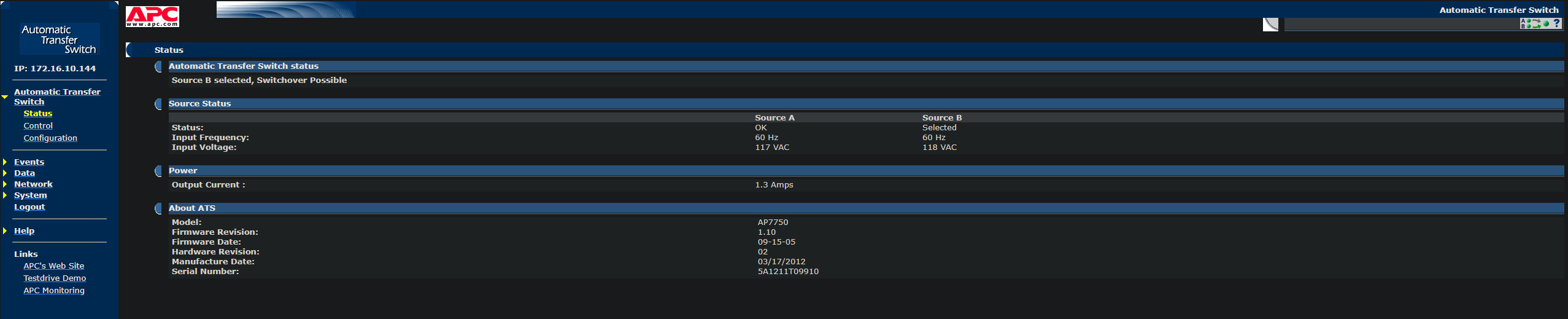
The web dashboards clearly identify the selected source.
ATS 1:
Source A / UPS 1 selected
Source B / UPS 2 available

ATS 2:
Source B / UPS 2 selected
Source A / UPS 1 available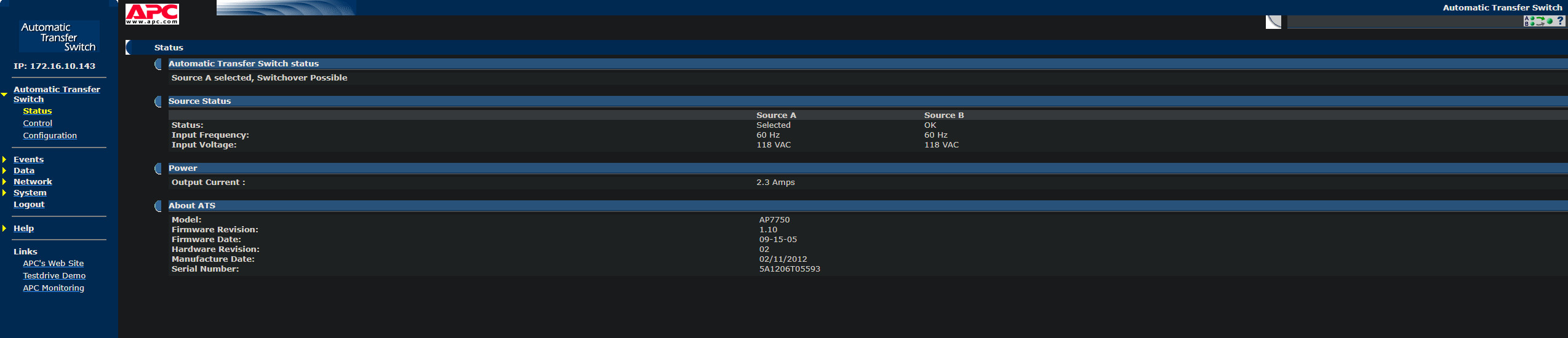
I compared the APC enterprise OID trees from both transfer switches, but I couldn’t safely determine whether one of the differing values represented the currently selected source or only the configured preferred source even after manually switching sources and probing again. Rather than building automation around a potentially wrong OID, I left ATS telemetry out of the initial shutdown controller. The OID’s were finicky anyway and I couldn’t find a translation library since they are so old.
The ATS hardware remains responsible for source transfer, essentially using “dumb” logic. The controller only needs the more reliable condition that both UPS units report an on-battery state before it considers the event a coordinated utility outage.
- ATS units handle electrical source failure and transfer with their pre-selected preferences.
- NUT monitors both UPS units and report power conditions.
- Shutdown orchestrator decides when server and infrastructure load should be removed.
Proxmox Shutdown Behavior#
The active Proxmox VE cluster currently includes home.lab, wyse01.lab, and wyse02.lab. pbs.lab is a separate Proxmox Backup Server appliance rather than a PVE cluster member.
Once one of the Proxmox hosts receives a normal poweroff command, Proxmox handles shutting down its managed containers and virtual machines according to the guest shutdown behavior already configured on that node, which allows me to use a basic shutdown command rather than overcomplicatinng shutdown orchestration. So the UPS controller doesn’t need to individually shut down every VM and container. Its responsibility is only to decide when the physical host should begin shutting down.
This keeps the power logic separate from the virtualization logic and avoids duplicating behavior Proxmox already handles by itself as long as I’m using commands correctly.
Dedicated Shutdown Access#
The orchestrator runs on wyse01.lab and uses a dedicated SSH key to send poweroff commands to the other systems.
ssh-keygen \
  -t ed25519 \
  -f /root/.ssh/ups-orchestrator \
  -N '' \
  -C 'wyse01 UPS shutdown orchestrator'
The public key was installed on each shutdown target.
home.lab
172.16.10.240

wyse02.lab
172.16.10.242

pbs.lab
172.16.10.243
I verified non-interactive access without issuing any shutdown commands.
ssh -i /root/.ssh/ups-orchestrator \
  root@172.16.10.240 hostname

ssh -i /root/.ssh/ups-orchestrator \
  root@172.16.10.242 hostname

ssh -i /root/.ssh/ups-orchestrator \
  root@172.16.10.243 hostname
All systems returned their appropriate hostname.
Using a separate key keeps the UPS shutdown path independent from administrative SSH credentials and makes the specific automation dependency easier to document and replace later.
UPS Shutdown Orchestrator#
The native NUT shutdown behavior is useful, but it doesn’t understand my rack’s two-UPS, two-ATS layout, nor does it understand the “idea” of preserving UPS 1 as reserve capacity after the primary server shuts down. Again, this is where back and forth with AI with an exact outline of what the script needs to do worked perfectly in my favor.
/usr/local/sbin/ups-orchestrator#!/usr/bin/env bash
set -uo pipefail
PATH=/usr/local/sbin:/usr/local/bin:/usr/sbin:/usr/bin:/sbin:/bin
# ---------------------------------------------------------------------------
# UPS sources
# ---------------------------------------------------------------------------
APC1="apc1@127.0.0.1"
APC2="apc2@127.0.0.1"
# ---------------------------------------------------------------------------
# Shutdown thresholds
# ---------------------------------------------------------------------------
# Shed home.lab to preserve APC1 reserve capacity.
APC1_CHARGE_THRESHOLD=60
# Shut down PBS when APC2 reaches five minutes of estimated runtime.
APC2_RUNTIME_THRESHOLD=300
# Treat an OFF or missing source as unavailable after this many seconds.
SOURCE_FAILURE_CONFIRM=30
# ---------------------------------------------------------------------------
# Shutdown targets
# ---------------------------------------------------------------------------
HOME_HOST="172.16.10.240"
PBS_HOST="172.16.10.243"
SSH_KEY="/root/.ssh/ups-orchestrator"
# ---------------------------------------------------------------------------
# Notifications and persistent state
# ---------------------------------------------------------------------------
MAIL_FROM="email@gmail.com"
MAIL_TO="email@shannonwetnight.com"
STATE_DIR="/var/lib/ups-orchestrator"
OUTAGE_FILE="$STATE_DIR/outage.active"
MODE="dry-run"
SIMULATE_HOME=0
SIMULATE_APC2=0
SIMULATE_APC1_FAILED=0
SIMULATE_APC2_FAILED=0
HAD_ERROR=0
usage() {
cat <<'USAGE'
Usage:
ups-orchestrator --dry-run
ups-orchestrator --live
ups-orchestrator --dry-run --simulate-home
ups-orchestrator --dry-run --simulate-apc2
ups-orchestrator --dry-run --simulate-all
ups-orchestrator --dry-run --simulate-apc1-failed
ups-orchestrator --dry-run --simulate-apc2-failed
Simulation cannot be combined with --live.
USAGE
}
while (($#)); do
case "$1" in
--dry-run)
MODE="dry-run"
;;
--live)
MODE="live"
;;
--simulate-home)
SIMULATE_HOME=1
;;
--simulate-apc2)
SIMULATE_APC2=1
;;
--simulate-all)
SIMULATE_HOME=1
SIMULATE_APC2=1
;;
--simulate-apc1-failed)
SIMULATE_APC1_FAILED=1
;;
--simulate-apc2-failed)
SIMULATE_APC2_FAILED=1
;;
--help|-h)
usage
exit 0
;;
*)
echo "Unknown argument: $1" >&2
usage >&2
exit 2
;;
esac
shift
done
if [[ "$MODE" == "live" ]] &&
(( SIMULATE_HOME == 1 ||
SIMULATE_APC2 == 1 ||
SIMULATE_APC1_FAILED == 1 ||
SIMULATE_APC2_FAILED == 1 )); then
echo "Refusing to combine simulation with live mode." >&2
exit 2
fi
install -d -m 700 "$STATE_DIR"
log() {
printf '%s %s\n' "$(date --iso-8601=seconds)" "$*"
}
log_error() {
printf '%s ERROR: %s\n' \
"$(date --iso-8601=seconds)" \
"$*" >&2
}
read_ups_value() {
local ups="$1"
local variable="$2"
timeout 8 upsc "$ups" "$variable" 2>/dev/null |
tail -n 1
}
has_status_flag() {
local status="$1"
local flag="$2"
[[ " $status " == *" $flag "* ]]
}
is_number() {
[[ "$1" =~ ^[0-9]+([.][0-9]+)?$ ]]
}
number_le() {
awk -v left="$1" -v right="$2" \
'BEGIN { exit !(left <= right) }'
}
value_or_unknown() {
local value="$1"
if [[ -n "$value" ]]; then
printf '%s' "$value"
else
printf 'unknown'
fi
}
# Independently track an OFF or missing UPS source.
#
# This avoids making the shutdown controller dependent on the email
# notification script. A short communication interruption does not
# immediately mark the source unavailable.
source_unavailable() {
local source_name="$1"
local status="$2"
local marker="$STATE_DIR/${source_name}.unavailable-observed"
local now modified
if [[ -z "$status" ]] || has_status_flag "$status" "OFF"; then
if [[ ! -e "$marker" ]]; then
date --iso-8601=seconds > "$marker"
chmod 600 "$marker"
fi
else
rm -f "$marker"
return 1
fi
now="$(date +%s)"
modified="$(stat -c %Y "$marker" 2>/dev/null)" || return 1
(( now - modified >= SOURCE_FAILURE_CONFIRM ))
}
send_notice() {
local subject="$1"
local body="$2"
if ! command -v mail >/dev/null 2>&1; then
log_error "The mail command is unavailable; could not send: ${subject}"
return 1
fi
if ! printf '%s\n' "$body" |
mail \
-r "$MAIL_FROM" \
-s "NUT: ${subject}" \
"$MAIL_TO"
then
log_error "Email notification failed: ${subject}"
return 1
fi
return 0
}
ups_snapshot() {
cat <<SNAPSHOT
APC1 status: $(value_or_unknown "$APC1_STATUS")
APC1 charge: $(value_or_unknown "$APC1_CHARGE")%
APC1 runtime: $(value_or_unknown "$APC1_RUNTIME") seconds
APC2 status: $(value_or_unknown "$APC2_STATUS")
APC2 charge: $(value_or_unknown "$APC2_CHARGE")%
APC2 runtime: $(value_or_unknown "$APC2_RUNTIME") seconds
SNAPSHOT
}
mark_coordinated_outage() {
if [[ -e "$OUTAGE_FILE" ]]; then
return 0
fi
if [[ "$MODE" == "dry-run" ]]; then
log "DRY RUN: would record a coordinated power event and send an outage notification."
return 0
fi
date --iso-8601=seconds > "$OUTAGE_FILE"
chmod 600 "$OUTAGE_FILE"
send_notice \
"Coordinated power event detected" \
"The UPS orchestrator on $(hostname) detected that no normal redundant power path remains.
The staged shutdown policy is now active.
$(ups_snapshot)
Time:
$(date --iso-8601=seconds)" || true
}
handle_full_recovery() {
local home_shed="No"
local pbs_shed="No"
[[ -e "$STATE_DIR/home.shutdown-sent" ]] &&
home_shed="Yes"
[[ -e "$STATE_DIR/pbs.shutdown-sent" ]] &&
pbs_shed="Yes"
if [[ "$MODE" == "dry-run" ]]; then
if [[ -e "$OUTAGE_FILE" ]]; then
log "DRY RUN: would send a power-restored notification and clear incident state."
fi
return 0
fi
if [[ -e "$OUTAGE_FILE" ]]; then
send_notice \
"Utility power restored: both UPS units online" \
"The UPS orchestrator on $(hostname) reports that both UPS units have returned to normal utility power.
Actions recorded during this incident:
home.lab shutdown initiated: ${home_shed}
pbs.lab shutdown initiated: ${pbs_shed}
$(ups_snapshot)
The outage and shutdown state flags have been reset. A future outage can trigger the policy again.
Time:
$(date --iso-8601=seconds)" || true
fi
rm -f \
"$OUTAGE_FILE" \
"$STATE_DIR/home.shutdown-sent" \
"$STATE_DIR/home.shutdown-failed" \
"$STATE_DIR/pbs.shutdown-sent" \
"$STATE_DIR/pbs.shutdown-failed" \
"$STATE_DIR/apc1.unavailable-observed" \
"$STATE_DIR/apc2.unavailable-observed"
}
shutdown_target() {
local state_name="$1"
local display_name="$2"
local host="$3"
local reason="$4"
local state_file="$STATE_DIR/${state_name}.shutdown-sent"
local failure_file="$STATE_DIR/${state_name}.shutdown-failed"
if [[ -e "$state_file" ]]; then
return 0
fi
if [[ "$MODE" == "dry-run" ]]; then
log "DRY RUN: would shut down ${display_name} (${host}): ${reason}"
return 0
fi
log "Sending shutdown command to ${display_name} (${host}): ${reason}"
if timeout 15 ssh \
-i "$SSH_KEY" \
-o BatchMode=yes \
-o ConnectTimeout=7 \
-o StrictHostKeyChecking=accept-new \
root@"$host" \
'systemctl poweroff --no-block'
then
date --iso-8601=seconds > "$state_file"
chmod 600 "$state_file"
rm -f "$failure_file"
send_notice \
"UPS shutdown initiated: ${display_name}" \
"The UPS orchestrator on $(hostname) successfully sent a shutdown command to ${display_name}.
Reason:
${reason}
$(ups_snapshot)
Time:
$(date --iso-8601=seconds)" || true
log "Shutdown command accepted by ${display_name}."
return 0
fi
log_error "Shutdown command failed for ${display_name}; it will be retried during the next evaluation."
# Retry the shutdown during each evaluation, but send only one failure
# email until the incident has been reset.
if [[ ! -e "$failure_file" ]]; then
date --iso-8601=seconds > "$failure_file"
chmod 600 "$failure_file"
send_notice \
"UPS shutdown failed: ${display_name}" \
"The UPS orchestrator could not send a shutdown command to ${display_name} at ${host}.
It will continue retrying during subsequent checks, but additional failure emails will be suppressed until power is restored.
Reason:
${reason}
$(ups_snapshot)
Time:
$(date --iso-8601=seconds)" || true
fi
return 1
}
# ---------------------------------------------------------------------------
# Read current UPS state
# ---------------------------------------------------------------------------
APC1_STATUS="$(read_ups_value "$APC1" ups.status)"
APC1_CHARGE="$(read_ups_value "$APC1" battery.charge)"
APC1_RUNTIME="$(read_ups_value "$APC1" battery.runtime)"
APC2_STATUS="$(read_ups_value "$APC2" ups.status)"
APC2_CHARGE="$(read_ups_value "$APC2" battery.charge)"
APC2_RUNTIME="$(read_ups_value "$APC2" battery.runtime)"
# ---------------------------------------------------------------------------
# Safe simulations
# ---------------------------------------------------------------------------
if (( SIMULATE_HOME == 1 )); then
APC1_STATUS="OB DISCHRG"
APC2_STATUS="OB DISCHRG"
APC1_CHARGE="59"
APC1_RUNTIME="500"
fi
if (( SIMULATE_APC2 == 1 )); then
APC1_STATUS="OB DISCHRG"
APC2_STATUS="OB DISCHRG"
APC2_CHARGE="15"
APC2_RUNTIME="299"
fi
# APC1 has failed and loads have transferred to APC2, which is now on battery.
if (( SIMULATE_APC1_FAILED == 1 )); then
APC1_STATUS=""
APC1_CHARGE=""
APC1_RUNTIME=""
APC2_STATUS="OB DISCHRG"
APC2_CHARGE="80"
APC2_RUNTIME="2400"
fi
# APC2 has failed and ATS2 has transferred to APC1, which is now on battery.
if (( SIMULATE_APC2_FAILED == 1 )); then
APC1_STATUS="OB DISCHRG"
APC1_CHARGE="80"
APC1_RUNTIME="1200"
APC2_STATUS=""
APC2_CHARGE=""
APC2_RUNTIME=""
fi
# ---------------------------------------------------------------------------
# Determine source states
# ---------------------------------------------------------------------------
APC1_OB=0
APC2_OB=0
APC1_LB=0
APC2_LB=0
APC1_ONLINE=0
APC2_ONLINE=0
APC1_UNAVAILABLE=0
APC2_UNAVAILABLE=0
has_status_flag "$APC1_STATUS" "OB" && APC1_OB=1
has_status_flag "$APC2_STATUS" "OB" && APC2_OB=1
has_status_flag "$APC1_STATUS" "LB" && APC1_LB=1
has_status_flag "$APC2_STATUS" "LB" && APC2_LB=1
if has_status_flag "$APC1_STATUS" "OL" &&
! has_status_flag "$APC1_STATUS" "OB" &&
! has_status_flag "$APC1_STATUS" "OFF"; then
APC1_ONLINE=1
fi
if has_status_flag "$APC2_STATUS" "OL" &&
! has_status_flag "$APC2_STATUS" "OB" &&
! has_status_flag "$APC2_STATUS" "OFF"; then
APC2_ONLINE=1
fi
if (( SIMULATE_APC1_FAILED == 1 )); then
APC1_UNAVAILABLE=1
elif source_unavailable "apc1" "$APC1_STATUS"; then
APC1_UNAVAILABLE=1
fi
if (( SIMULATE_APC2_FAILED == 1 )); then
APC2_UNAVAILABLE=1
elif source_unavailable "apc2" "$APC2_STATUS"; then
APC2_UNAVAILABLE=1
fi
BOTH_ONLINE=0
if (( APC1_ONLINE == 1 && APC2_ONLINE == 1 )); then
BOTH_ONLINE=1
fi
# ---------------------------------------------------------------------------
# Full recovery: notify once and reset persistent incident state
# ---------------------------------------------------------------------------
if (( BOTH_ONLINE == 1 )); then
handle_full_recovery
fi
# ---------------------------------------------------------------------------
# Determine whether staged shedding is active
# ---------------------------------------------------------------------------
COORDINATED_EVENT=0
# Keep an already-detected outage active until both sources fully recover.
# This prevents the incident from being forgotten when a depleted UPS changes
# from OB/LB to OFF or stops communicating.
if [[ -e "$OUTAGE_FILE" ]] && (( BOTH_ONLINE == 0 )); then
COORDINATED_EVENT=1
# Normal whole-building outage.
elif (( APC1_OB == 1 && APC2_OB == 1 )); then
COORDINATED_EVENT=1
# APC2 failed or became critical, ATS2 moved to APC1, and APC1 is now on
# battery.
elif (( APC1_OB == 1 &&
(APC2_UNAVAILABLE == 1 || APC2_LB == 1) )); then
COORDINATED_EVENT=1
# APC1 failed or became critical, loads moved to APC2, and APC2 is now on
# battery.
elif (( APC2_OB == 1 &&
(APC1_UNAVAILABLE == 1 || APC1_LB == 1) )); then
COORDINATED_EVENT=1
fi
if (( COORDINATED_EVENT == 0 )); then
if [[ -t 1 ]]; then
log "No coordinated power event detected; no shutdown action."
log "APC1: status=$(value_or_unknown "$APC1_STATUS"), charge=$(value_or_unknown "$APC1_CHARGE")%, runtime=$(value_or_unknown "$APC1_RUNTIME")s"
log "APC2: status=$(value_or_unknown "$APC2_STATUS"), charge=$(value_or_unknown "$APC2_CHARGE")%, runtime=$(value_or_unknown "$APC2_RUNTIME")s"
fi
exit 0
fi
mark_coordinated_outage
# ---------------------------------------------------------------------------
# Stage 1: shed home.lab to preserve the remaining protected source
# ---------------------------------------------------------------------------
if (( APC1_UNAVAILABLE == 1 || APC1_LB == 1 )); then
if ! shutdown_target \
"home" \
"home.lab" \
"$HOME_HOST" \
"APC1 is unavailable or critical during a coordinated power event; home.lab is being shed to preserve the remaining protected source."
then
HAD_ERROR=1
fi
elif is_number "$APC1_CHARGE" &&
number_le "$APC1_CHARGE" "$APC1_CHARGE_THRESHOLD"; then
if ! shutdown_target \
"home" \
"home.lab" \
"$HOME_HOST" \
"APC1 charge is ${APC1_CHARGE}%, at or below the ${APC1_CHARGE_THRESHOLD}% reserve threshold during a coordinated power event."
then
HAD_ERROR=1
fi
fi
# ---------------------------------------------------------------------------
# Stage 2: stop PBS activity while keeping wyse02 online
# ---------------------------------------------------------------------------
if (( APC2_UNAVAILABLE == 1 || APC2_LB == 1 )); then
if ! shutdown_target \
"pbs" \
"pbs.lab" \
"$PBS_HOST" \
"APC2 is unavailable or critical during a coordinated power event; PBS is being shed to preserve the remaining protected source."
then
HAD_ERROR=1
fi
elif is_number "$APC2_RUNTIME" &&
number_le "$APC2_RUNTIME" "$APC2_RUNTIME_THRESHOLD"; then
if ! shutdown_target \
"pbs" \
"pbs.lab" \
"$PBS_HOST" \
"APC2 estimated runtime is ${APC2_RUNTIME} seconds, at or below the ${APC2_RUNTIME_THRESHOLD}-second threshold."
then
HAD_ERROR=1
fi
fi
if [[ -t 1 ]]; then
log "Evaluation complete."
log "APC1: status=$(value_or_unknown "$APC1_STATUS"), charge=$(value_or_unknown "$APC1_CHARGE")%, runtime=$(value_or_unknown "$APC1_RUNTIME")s"
log "APC2: status=$(value_or_unknown "$APC2_STATUS"), charge=$(value_or_unknown "$APC2_CHARGE")%, runtime=$(value_or_unknown "$APC2_RUNTIME")s"
fi
exit "$HAD_ERROR"This became one of those parts of the project where I understood the required behavior and safety conditions and rely on AI for the script implementation itself.
- Poll both UPS units through the local NUT server.
- Read UPS status, battery charge, and estimated runtime.
- Validate that all required telemetry is present and numeric.
- Refuse to shut down anything when telemetry is missing or invalid.
- Require both UPS units to report
OBbefore load shedding begins. - Shut down
home.labwhenAPC 1reaches the reserve threshold (60%). - Shut down
pbs.labwhenAPC 2reaches the runtime threshold (5 minutes). - Use per-target state markers to prevent duplicate shutdown commands.
- Retry failed shutdown commands during the next scheduled evaluation.
- Clear the outage and shutdown state after utility power returns.
- Support dry-run threshold simulations.
- Refuse to combine simulation options with live mode.
- Send email for meaningful outage, shutdown, failure, and recovery events.
The default manual mode is a dry-run. A real shutdown can occur only when the script is explicitly started with the --live flag.
Additional validation modes are included with their own respective flags.
/usr/local/sbin/ups-orchestrator --dry-run/usr/local/sbin/ups-orchestrator \
--dry-run \
--simulate-home/usr/local/sbin/ups-orchestrator \
--dry-run \
--simulate-apc2/usr/local/sbin/ups-orchestrator \
--dry-run \
--simulate-allThe script refuses to combine any simulation option with --live. This prevents simulated battery values from accidentally producing a real poweroff command. I’ll call it a win for AI for staying within the confines of my instructions.
Notification Behavior#
The final notification model uses two related paths.
The first path is the basic NUT notification script configured through upsmon.conf. This handles immediate NUT events reported in the upsmon.conf.
UPS entered an on-battery state
Utility power returned
UPS communication was lost
UPS communication was restored
Low battery condition
Forced shutdown condition
Battery replacement warningThe second path is the shutdown orchestrator. These notifications describe higher-level policy decisions rather than every UPS state change. The orchestrator sends notifications for meaningful transitions and decisions based on the script logic.
A coordinated outage has been detected
A staged shutdown command has been initiated
A remote system accepted its shutdown command
A shutdown command failed and will be retried
Utility power has returned
The orchestrator has cleared its outage state and rearmedThe messages include the relevant UPS status, battery charge, estimated runtime, affected host, and reason for the action. It doesn’t send email during every 30-second evaluation (silenced). State markers prevent the same outage or shutdown action from generating repeated notifications during every timer cycle. After utility power returns and both UPS units return to a normal online state, the recovery state is cleared. This allows a future outage to generate new notifications and execute the shutdown stages normally instead of remaining latched from the previous event.
State and Recovery Handling#
Runtime state is stored here:
/var/lib/ups-orchestratorThe state files act as latches for outage and shutdown events. For example, after a shutdown command has been successfully sent to home.lab, the script records that action. The next timer cycle can still evaluate UPS status, but it will not repeatedly send the same shutdown command or email notification as to avoid noise and needless commands after something has already been turned off.
When utility power returns, the script verifies the recovered online state and clears the applicable outage and shutdown markers. This recovery behavior was important to test because a controller that works once but never rearms would not be particularly useful during the next outage. When this was running last year, the reset condition was not configured correctly and required manually intervention to allow clients to reboot properly without receiving a stuck shutdown command, so I’m glad this is fixed moving forward.
I ran a full live recovery test confirmed that the state cleared correctly and the controller returned to its normal ready condition after power was restored. Surprisingly, I didn’t upset the kids during this test.
Systemd Service#
The controller runs through a one-shot systemd service.
nano /etc/systemd/system/ups-orchestrator.service[Unit]
Description=UPS staged shutdown orchestrator
Wants=network-online.target
After=network-online.target nut-server.service
Requires=nut-server.service
[Service]
Type=oneshot
ExecStart=/usr/local/sbin/ups-orchestrator --live
StandardOutput=null
StandardError=journalNormal script output is discarded when run through systemd, while errors still reach the journal. The script prints detailed status information when run manually from a terminal, but there is no reason to write the same normal UPS status to journald every 30 seconds in production.
Systemd still records the service lifecycle entries as:
Starting UPS staged shutdown orchestrator...
Finished UPS staged shutdown orchestrator.These entries provide confirmation that the timer is continuing to run without needlessly filling the journal with complete UPS telemetry during every cycle. As a bonus, because it’s using the journal, retention and cleanup continue to be handled by the default system-wide journald policy rather than a separate log file created by the orchestrator.
Systemd Timer#
The service is started by a systemd timer that evaluates the policy every 30 seconds.
nano /etc/systemd/system/ups-orchestrator.timer[Unit]
Description=Evaluate UPS shutdown policy every 30 seconds
[Timer]
OnBootSec=1min
OnUnitActiveSec=30s
AccuracySec=5s
Unit=ups-orchestrator.service
[Install]
WantedBy=timers.targetI loaded and enabled the timer.
systemctl daemon-reload
systemctl enable --now ups-orchestrator.timerI then confirmed that it was active.
systemctl status ups-orchestrator.timer --no-pager
systemctl list-timers ups-orchestrator.timerThe production service explicitly calls the script with --live, while manual execution remains dry-run unless I deliberately request live operation.
Dry-Run Validation#
First I tested the normal online state.
/usr/local/sbin/ups-orchestrator --dry-runWith both UPS units online, the script correctly reported that no coordinated outage existed and took no action as it was not required based on the simulated values. I then simulated APC 1 reaching the server-shedding threshold.
/usr/local/sbin/ups-orchestrator \
  --dry-run \
--simulate-homeThe script selected only home.lab.
DRY RUN: would shut down home.lab (172.16.10.240)
Reason:
Both UPS units are on battery and APC 1 charge is at or below
the 60% reserve threshold.Next, I simulated APC 2 reaching 5 minutes of remaining runtime.
/usr/local/sbin/ups-orchestrator \
  --dry-run \
--simulate-apc2The script selected pbs.lab for shutdown as intended. Finally, I simulated both shutdown stages together.
/usr/local/sbin/ups-orchestrator \
  --dry-run \
--simulate-allThis validated and concluded the full test path without issuing any real shutdown commands.
Live Failover Validation#
Time to test in prod. After the dry-run tests passed, I enabled the production service and performed a real failover test. The test confirmed the most important behavior in the design.
- A single-source failure does not trigger staged shutdowns.
- The ATS transfers the affected load to the alternate available source.
- The attached systems remain online through the transfer.
- The orchestrator waits because both UPS units are not reporting a coordinated outage.
This is exactly what I wanted to see. A failed UPS, disconnected cable, or isolated input problem are problems I would classify as a hardware failure only affecting one device and should be handled by the transfer switches. NUT should report the power event, but the controller shouldn’t begin shutting down healthy systems just because one source failed.
I also confirmed the recovery path after the test. Once normal power conditions returned, the orchestrator cleared its outage state and rearmed itself for the next event. The email notifications also arrived as expected throughout the test, and no duplicate shutdown or recovery messages were generated during later timer cycles. I’ll have to create additional email tags to throw these alerts into their proper Home Lab/NUT folder now.
Backups#
I copied the active configuration and automation files to the existing Backups network share created earlier during the home lab rebuild.
The backup includes the working copies of several files.
NUT server and monitor configuration
NUT user and listener configuration
NUT notification script
Postfix relay configuration
UPS shutdown orchestrator
Systemd service unit
Systemd timer unit
Supporting SSH public-key information and recovery notes, no private keys (will invalidate and re-issue a key if a problem exists in the future)
This gives me an external copy of the working configuration outside the operating system installed on wyse01.lab. If the node ever needs to be rebuilt, I don’t have to recreate the scripts and service units from the article or depend on remembering every small change made during testing, as this article combined with the configuration backups will allow me to retrace my steps to recreate where needed.
Final Power-Loss Behavior#
Normal Operation

ATS 1 prefers UPS 1.
ATS 2 prefers UPS 2.
Both alternate sources remain available.
Single UPS or Source Failure
The affected ATS transfers to the alternate source.
NUT sends an event notification.
No staged shutdown occurs.Both UPS Units Lose Utility Power
NUT reports both units on battery,
The orchestrator begins evaluating thresholds.
APC 1 reaches 60% charge,
home.lab receives a graceful poweroff command,
VMs and containers are shut down by Proxmox,
The large server load is removed,
The remaining APC 1 capacity is preserved as reserve.
APC 2 reaches 300 seconds of runtime remaining,
pbs.lab receives a graceful poweroff command.
wyse01.lab stays online,
wyse02.lab stays online,
DNS remains available,
Routing and switching remain online for as long as the remaining
UPS and ATS capacity allows.
If utility power returns,
Both Dell Wyse nodes are configured to recover automatically with a BIOS setting,
NUT reports the online state,
Recovery email is sent,
Outage and shutdown state markers are cleared,
The controller is rearmed for the next outage.Current Status#
The Network UPS Tools portion of the rebuild is now complete. The final design is more involved than simply installing NUT and waiting for a low-battery signal, but it matches the physical power layout of the rack and the philosophy that I was shooting for last year. The system now treats the available battery capacity according to workload priority rather than allowing the primary server to consume the same power reserve needed by DNS, routing, switching, and the rest of the critical network stack.
The real failover test passed, the recovery behavior worked, and the current production configuration is backed up. This part of the rebuild is officially ready to be called complete (pending minor changes if necessary once learn.lab is online in the future, which should include installing another SSH key and adding it to the list of shutdowns to issue, nothing too complicated).
From the previous article:
The next major project will likely be the backup appliance. I have a third Dell Wyse 5070 that I plan to turn into a custom backup/NAS-style system for Proxmox and the SCHBKUPS pool using PBS. The idea is to use two 2 TB drives in a mirrored configuration and build a custom enclosure for the project. I will likely 3D print the enclosure in PETG and design it as a four-bay enclosure, even though I only plan to populate two drive bays for now. Drive prices are still ridiculous, so two drives is enough to get started. (Project scope has changed a little bit, currently waiting on parts for this to be completed.)
I’ve passed my CompTIA Security+ exam and have a couple of weeks off of school, so I should be able to make some more progress on this rebuild until the next round of classes start (which include studying for and passing Network+). Between school, documentation, and the hands-on experience I’m getting from my internship, the home lab continues to rebuild one (slow but sure) piece at a time.
Reply by Email