OneDrive - Silent Sign-in and Known Folder Move#
OneDrive Known Folder Move protects user files from the most important user-facing folders.
Policy name:
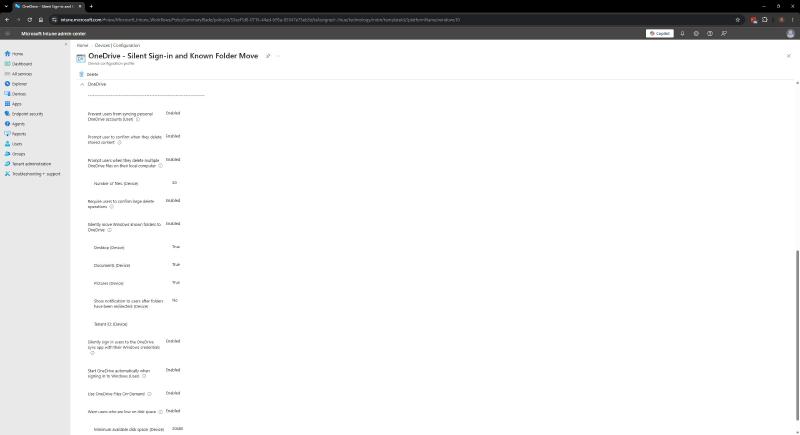
OneDrive - Silent Sign-in and Known Folder Move
Silently sign in users to OneDrive with Windows credentials:
Enabled
Start OneDrive automatically:
Enabled
Silently move Windows known folders to OneDrive:
Enabled
Known folders protected:
Desktop
Documents
Pictures
Use OneDrive Files On-Demand:
Enabled
Prevent syncing personal OneDrive accounts:
Enabled
Warn users low on disk space:
Enabled
Minimum available disk space:
20480 MB
Prompt users when deleting many files:
Enabled
Multiple-delete threshold:
50 files
Require confirmation for large delete operations:
EnabledThe initial OneDrive policy had a duplicate Known Folder Move setting, which caused a conflict. The duplicate was removed, and the policy reported successfully once this was fixed.
Windows - Backup and Settings Roaming#
Windows Backup was enabled through Settings Catalog.
Policy name:
Windows - Backup and Settings Roaming
Enable Windows Backup = Enabled
Enable Windows Backup And Restore = Enable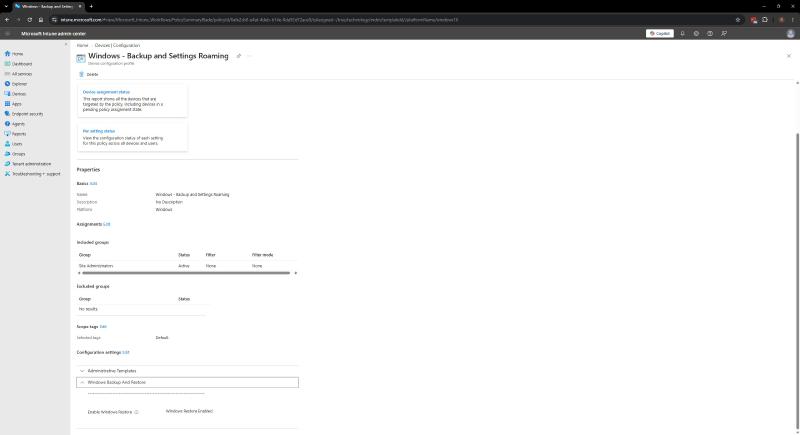
Practical Recovery Model#
The tenant now uses the following recovery approach:
- OneDrive Known Folder Move
- Windows Backup for Organizations
- Required Intune apps and Company Portal self-service catalog
- BitLocker recovery keys escrowed to Microsoft Intune
- Local administrator recovery through Windows LAPS-managed account
Device rebuild path:
- Fresh Windows install
- Microsoft Entra join
- Intune enrollment
- policy deployment
- app deployment
- OneDrive/Windows Backup restore
- Microsoft Entra join
This is not a traditional full-image backup design. It is a cloud-managed endpoint recovery model where a device can be rebuilt and restored through Microsoft cloud services and Intune policy. A full-image backup design is not necessary here, as most of what we need are simply files and settings that will be available to the user regardless of which device they are signed into, with the exception, of course, being anything locally saved to that specific device.
Reply by Email