Conditional Access#
Security Defaults#
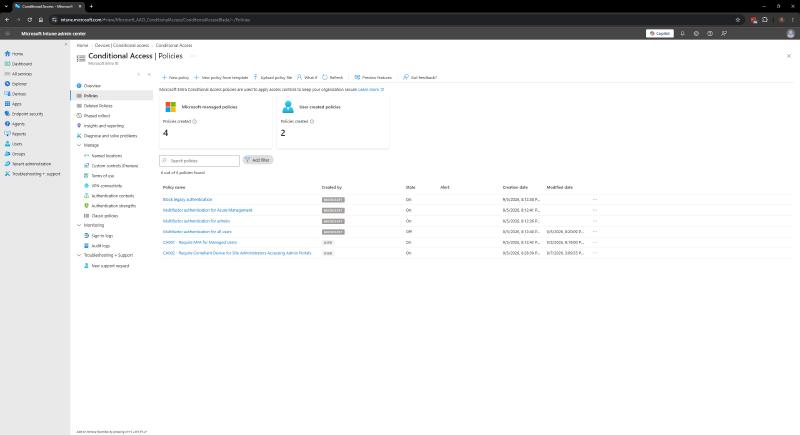
Security Defaults were disabled so custom Conditional Access policies could be used. Microsoft-managed defaults were converted into Microsoft-managed Conditional Access policies.
Recommended Microsoft-managed policy state:
Block legacy authentication:
On

Multifactor authentication for Azure Management:
On

Multifactor authentication for admins:
On

Multifactor authentication for all users:
Off
The broad Microsoft-managed MFA for all users policy was not used as the primary MFA strategy because the tenant uses intentional group-based scoping.
CA001 - Require MFA for Managed Users#
This provides MFA for managed parent/admin users and Kidcave accounts without unintentionally targeting service/mailbox endpoints or other non-interactive accounts.
Include:
Site Administrators
Kidcave

Target resources:
All cloud apps / all resources

Grant:
Require multifactor authentication

State: On
CA002 - Require Compliant Device for Admin Portals#
The first version of the compliant-device policy targeted too broadly and created an enrollment catch-22 during OOBE. A fresh device could not complete the enrollment path because the policy required the device to already be compliant. The policy was rebuilt with a narrower and more practical purpose to protect the administrative plane without blocking normal productivity apps if a device temporarily falls out of compliance.
Include:
Site Administrators

Target resources:
Microsoft Admin Portals

Grant:
Require device to be marked as compliant

State: On
This design allows users to continue using Office, OneDrive, school resources, and normal productivity tools during minor compliance delays, while still preventing a non-compliant device from accessing admin portals where tenant-wide changes could be made.
Reply by Email