Overview#
GameShelf is an open-source project I maintain for a straightforward purpose: making a local collection of DRM-free game installers easier to browse and download. Instead of navigating a shared folder or requiring a separate launcher, users can open a web page, find a game, and download its folder as a ZIP archive.
The intended use is a small local network, such as a household with a handful of users. The collection stays in ordinary folders on existing storage. GameShelf provides the browsing and download interface without adding an account system or changing how those files are organized.
Source code and documentation · Releases · Container image
Visual Showcase#
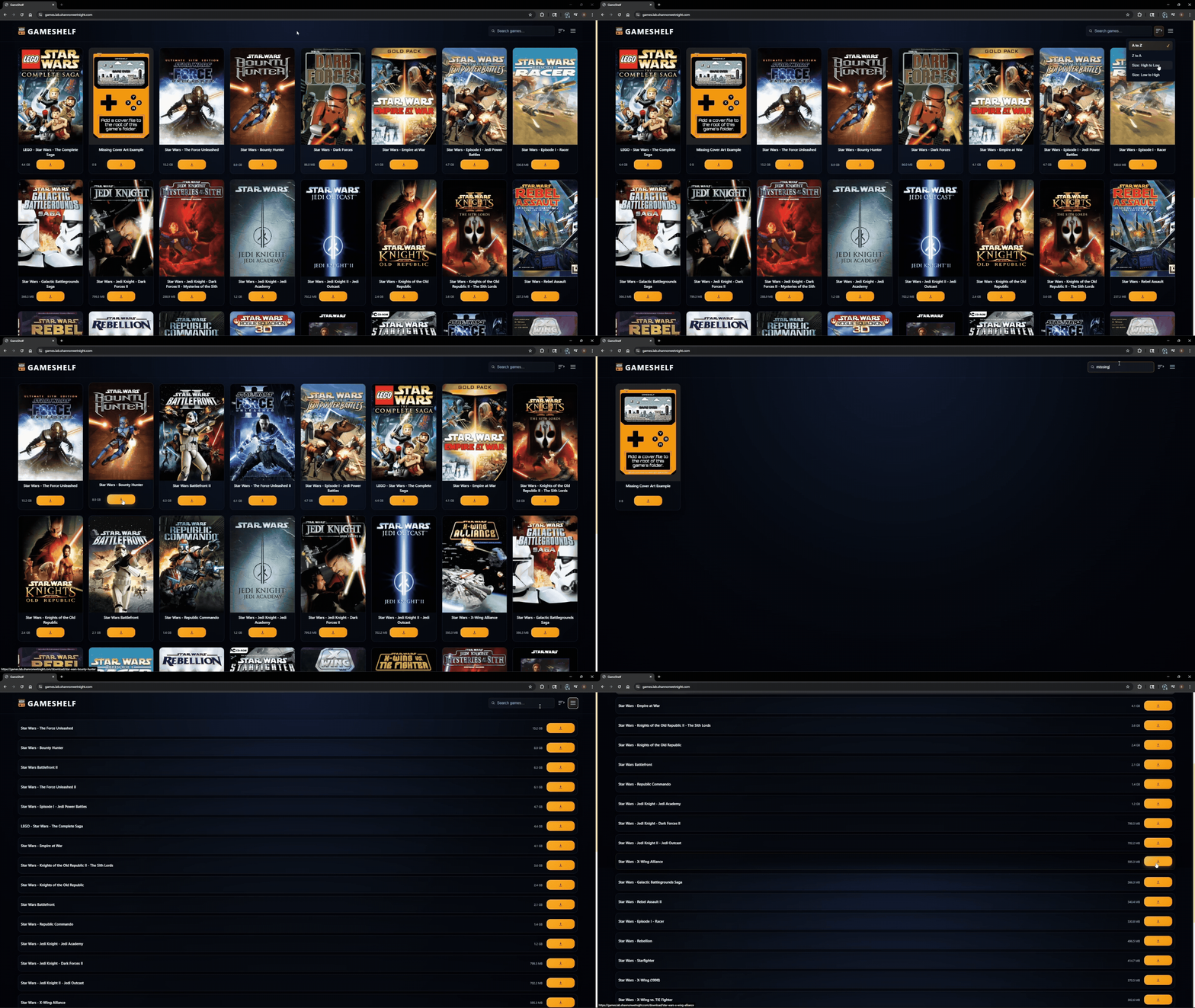
GameShelf’s browser interface, using locally supplied cover art.
What GameShelf Does#
- Folder indexing: Each game lives in a directory under the configured library root. GameShelf uses the directory name as the game title and calculates the size of its contents.
- Local cover art: Users can place
cover.jpg,cover.jpeg,cover.png,folder.jpg,folder.jpeg, orfolder.pngdirectly in a game’s directory. A placeholder appears when no supported image is available. - Search and sorting: The web interface provides local search and sorting, including
/to focus search andEscto clear it. - ZIP downloads: A download request packages the selected game folder and streams the archive to the browser. There is no separate collection of prebuilt ZIP files to maintain.
- Library rescans: Users can request a manual rescan, or configure periodic rescanning with
GAMESHELF_REFRESH_INTERVAL.
Cover art is supplied locally; automatic artwork lookup is not currently implemented. Files are added, renamed, or removed through the underlying storage rather than through GameShelf.
Architecture and Read-Only Design#
The backend is written in Go and uses its standard library for HTTP serving, directory scanning, JSON responses, and ZIP creation. The static web interface is embedded into the executable with Go’s embed package, so it is served by the same application rather than a separate frontend service. The library index is held in memory; there is no external database to deploy.
The application scans the configured root directory, records the available game folders and covers, and serves that information to the browser. Downloads read the selected folder and write a ZIP stream directly to the HTTP response. GameShelf does not need a writable library or a temporary archive directory for that process.
This keeps deployment small and leaves the source collection under the storage administrator’s control. A read-only Docker bind mount enforces that boundary for the mounted library. It still needs to grant the container user permission to read files and traverse directories.
Docker Deployment#
GameShelf can run with Docker or Docker Compose. A minimal Compose service looks like this:
services:
  gameshelf:
    image: ghcr.io/shannonwetnight/gameshelf:latest
    restart: unless-stopped
    ports:
      - "8080:8080"
    environment:
      GAMESHELF_ROOT: /games
      GAMESHELF_REFRESH_INTERVAL: 12h
    volumes:
      - /path/to/your/library:/games:ro
    security_opt:
      - no-new-privileges:true
Replace the host path with the collection’s directory, start the service, and open the Docker host’s address on port 8080. Each game should have its own folder beneath the mounted root, with any cover image directly inside that game’s folder.
The current image runs as the unprivileged UID/GID 10001:10001. Host permissions must allow that identity to read the collection, or the deployment can use an appropriate existing non-root identity. The README’s deployment instructions cover permission overrides and additional container settings.
GAMESHELF_ROOT selects the library directory, GAMESHELF_ADDR changes the listening address, and GAMESHELF_REFRESH_INTERVAL controls rescanning. The example sets the scan interval explicitly; use 0 to disable scheduled rescans.
Scope and Limitations#
GameShelf is a local file distributor, not a game launcher, installer, or download source. It serves files already present in the configured collection and should be used only for content the operator is permitted to share.
There are no built-in user accounts, profiles, or authentication. A reverse proxy can add HTTPS and external authentication, but those controls belong to the surrounding deployment. Remote access requires deliberate access controls; the application’s read-only design does not restrict who can download files from an exposed instance.
The project is MIT licensed. Its README also describes the use of AI assistance for parts of development, with architecture decisions and final code reviewed and curated by the maintainers.
Reply by Email